Keep selected PDF pages and change their order
Move a cover to the end or leave out an unwanted page by entering the page numbers you want to keep. The tool creates a new PDF and leaves your original file unchanged.
SheetSum team · Screens checked: September 8, 2026
Follow these steps
Choose a PDF
Download the three-page practice PDF below, then open it with Choose PDFs.
Enter the pages in the order you need
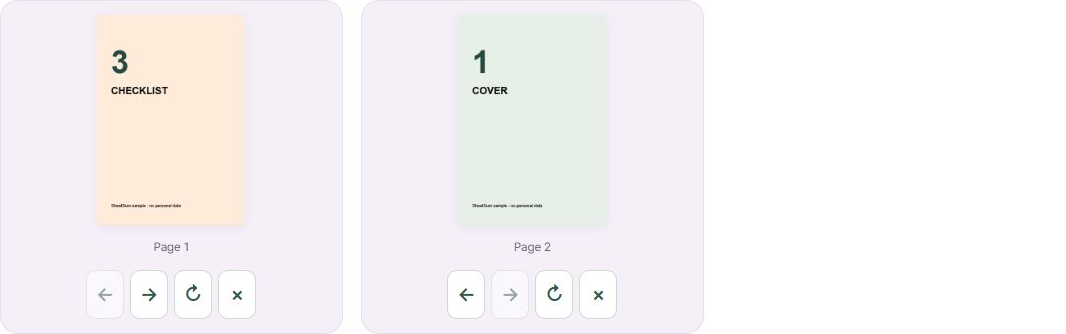
Enter 3, 1 in Pages to keep, in order. This keeps original page 3 followed by original page 1. Leave the field blank for all pages. Ranges such as 1-3 work; duplicate numbers appear only once.
Create the new PDF
Select Create PDF and wait for the result. Count from the first page in the file, rather than using page numbers printed inside the document.
Check the preview and download
Open Preview result pages and check the order and orientation. If you rotate or remove pages in the preview, select Apply edits before downloading the updated file.
Before you start
- This mode accepts one PDF, up to 25 MiB and 30 input pages.
- Password-protected PDFs, interactive forms and digital signatures are not supported. Links, annotations and bookmarks may not be preserved.
- This is a page selection tool, not a secure redaction or sanitization tool.
Files and entries are processed in your browser.
Common questions
What if the page selection fails?
Check the page count and numbers. Page 4 does not exist in a three-page file. If the file exceeds the limits, start with a smaller document.
Can I combine several PDFs?
Use Merge PDF files for that. This guide selects and orders pages within a single file.