Edit resume fields and reorder education and experience
Change section headings, table columns and individual cells directly. Add the sections you need and arrange them to suit the role you are applying for.
SheetSum team · Screens checked: September 8, 2026
Follow these steps
Choose a layout
Start with a simple, profile or photo layout. Use the sample button to explore the editor with fictional details. For US applications, choose a photo-free layout unless the application specifically requires a picture.
Edit the fields on the page
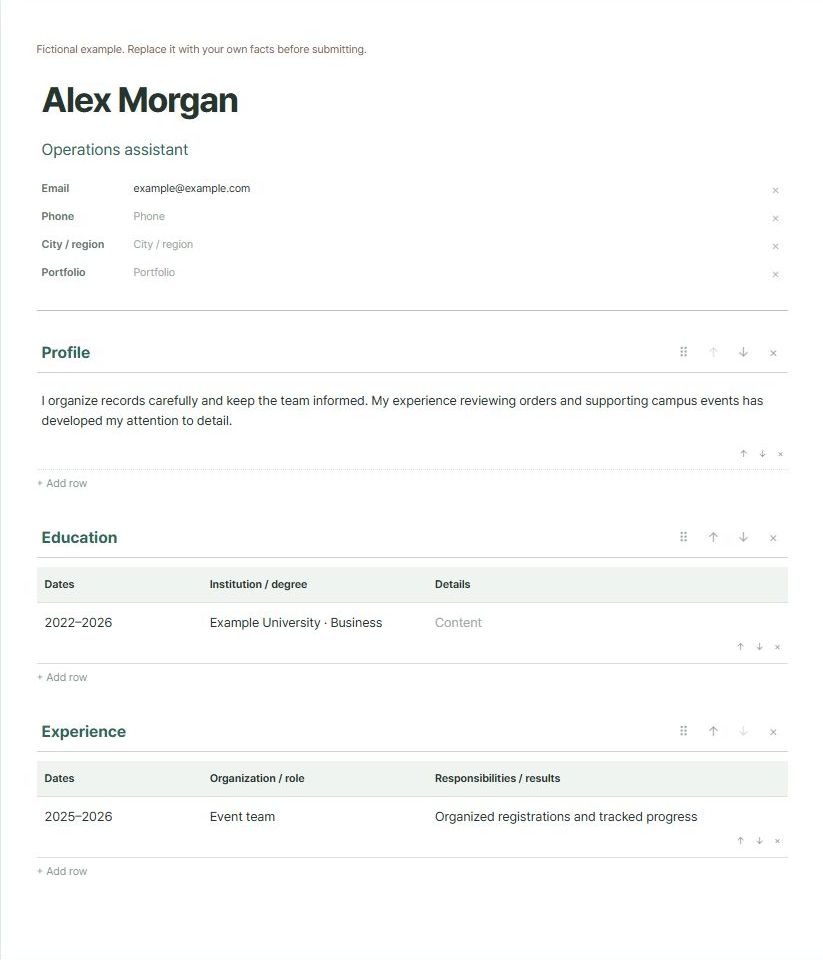
Click names, field labels, section headings, column headings and cells in the paper preview. Add or remove rows for education and experience.
Reorder sections
Drag a section handle or use its up and down buttons. Keyboard controls are also available. Add text or a table using the controls beside the preview.
Save your editable project
If a photo is needed, insert it and adjust its position and zoom. Save the project JSON to continue editing later, then reopen that file in the editor.
Inspect your submission file
Use the browser print dialog to save a PDF if that matches the application requirements. Open the saved file and check line breaks and pagination; output can vary by browser.
Before you start
- Photos: up to 5MB and 13 million pixels. Project JSON: up to 5MB.
- There is no automatic saving of your entries or photo. Save the project JSON before reloading or closing the page.
- Free-position layout, merged table cells and DOCX export are not supported.
- Follow the employer’s required format. No ATS screening result or recruiting-system compatibility is guaranteed.
Files and entries are processed in your browser.
Common questions
Should I send the JSON file to an employer?
No. JSON is the editable project for this tool. Prepare your submission in the file format requested by the employer.
Do I need a photo?
Use the employer’s instructions. You can use the simple layout without a photo or remove an existing photo.